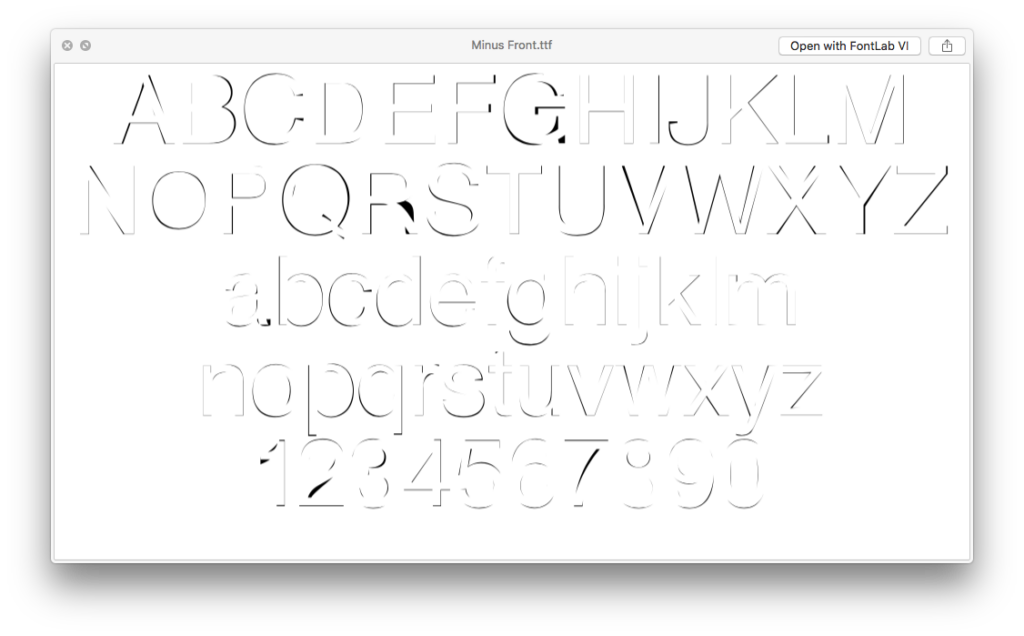
Helvetica Placed on Arial (in Illustrator)
<p>“Helvetica Placed on Arial (in Illustrator)” is a typeface that comes in two styles: Minus Front and Minus Back. Minus Front subtracts Helvetica from Arial (in Illustrator) and Minus Back subtracts Arial from Helvetica (in Illustrator).</p> <p>Below are the steps used for designing this typeface:<br /> 1- Set the entire glyph set in 50 pt Helvetica in Illustrator.<br /> 2- Set the same glyph set also in 50 pt Arial in Illustrator.<br /> 3- Place Helvetica glyph set on Arial Glyph set.<br /> 4- Expand both glyph sets.<br /> 5- Ungroup both glyph sets.<br /> 6- For each glyph, center align the Helvetica and the Arial versions both horizontally and vertically.<br /> 7- For achieving “Helvetica Placed on Arial (in Illustrator), Minus Front,” execute the minus front pathfinder tool for all of the glyphs. This will subtract Helvetica from Arial.<br /> 8- Repeat the steps 1-6 on a new artboard.<br /> 9- For achieving “Helvetica Placed on Arial (in Illustrator), Minus Back,” execute the minus back pathfinder tool for all of the glyphs. This will subtract Arial from Helvetica.</p>
Authors: Nazli Ercan